


“When you catch an adjective, kill it.” — Mark Twain
“The road to hell is paved with adverbs.” — Stephen King
“Adverbs are the sign that you’ve used the wrong verb.” — Annie Dillard
“We don’t need another adverb....” — Tina Turner (Allegedly)
Every writer has a nemesis. For some it’s the blank page. For others it’s the second act. For me, it’s adjectives and adverbs — and I’ve been at war with them for decades.
I spent my career in marketing, and there is nothing I professionally despise more than marketing speak — adverbs and adjectives deployed as unsupported superlatives, puffing up sentences that have nothing inside them. “Revolutionary.” “Incredibly powerful.” “Truly world-class.” Lacquer words. Ultra glossy on the outside, particle board on the inside.
So when I write prose, I wield a pen, a steelyard, and a sword. I behead every weak modifier I find and only elevate the strong. I am a textual tyrant.
And yet. And yet. Even with a hatred of aguish adverbs and algid adjectives that burns with the heat of a thousand sempiternal suns, these vainglorious vermin still burrow their way into my writing. They sneak past the gates while I’m not looking, disguised as emphasis, wearing rat-sized hats that read “but I’m helping.”
I crafted Thunderprose to catch the ones I miss.
What Is Thunderprose?
Thunderprose is a custom AI prompt that turns Claude — Anthropic’s commercial AI — into a theatrical, WWE-commentator-meets-English-professor writing editor. You paste in your prose, and it runs every adjective and adverb — every adverbjective, if you will, (and to be clear, you shouldn’t) — through a gladiatorial arena. Many modifiers enter; only the strong leave.
Here are egregious examples of the weakness it susses out. These aren’t the only criminally overused modifiers it looks for — just some of the most common literary rabble:
The “Suddenly” Massacre — adverbs that manufacture fake tension. If the sentence already implies urgency, the adverb is dead weight.
The Redundancy Pit — adverbs that repeat what the verb already says. “Smiled happily.” “Sprinted fast.” The verb did the job. The adverb is just clapping along.
The Heavyweight Bouts — weak intensifiers propping up lazy adjectives. “Very big dark house” gets demolished and replaced by a single, more muscular noun — “mausoleum,” for instance — a steel chair off the top rope. Mark Twain had his own version of this move: “Substitute ‘damn’ every time you’re inclined to write ‘very’; your editor will delete it and the writing will be just as it should be.” Thunderprose skips the middleman and just sends “very” straight to the lions.
The output is formatted like a wrestling match card: 🩸 THE CARNAGE (what died and why), 🪑 THE STEEL CHAIR (alternative words that demolished the incumbent in the ring), 🏆 THE REIGNING CHAMPIONS (what survived and why), and 💀 THE VERDICT (the edited draft).
It is extremely fun. It is also genuinely useful.
Thunderprose In Action
I ran a chapter from Inference through the arena — a scene narrated by Pippin, an AI who curates Tolkien memes for his human’s group chat. Here’s what happened.
The Kills
“very” — “I am very good at it.”
“’Very’ shuffled into the arena wearing a t-shirt that said ‘I’M HELPING’ and the lions didn’t even wait for the bell. Pippin’s voice is confident. Matter-of-fact. The line ‘I am good at it’ is a statement of quiet, earned certainty. Tacking ‘very’ onto it is like putting a foam finger on a knight’s lance. It doesn’t amplify — it cheapens. Death by irrelevance. The crowd yawned.”
“interesting” — “when I see something interesting”
“’Interesting’ stumbled into the ring with no weapons, no armor, and no specificity whatsoever. This is the moment the entire chapter pivots — routine scanning becomes a distress signal — and the best this adjective could manage was ‘interesting’? That’s a word you use to describe a coworker’s vacation photos.”
The Champions
“sacred” — “my sacred duty”
“A magnificent overstatement that tells us everything about Pippin’s character in two words. He treats meme-curating like holy work. It’s funny, it’s endearing, and it’s doing triple-duty as voice, tone, and worldbuilding. Champion. Untouchable.”
“furious” — “The cat looks furious.”
“Precise. Visual. Funny. This adjective showed up in full gladiator armor and the lions backed away. You can see that cat. Champion.”
But Here’s the Important Part
Thunderprose identifies. You decide.
The arena flagged “very” and “interesting” as weak. It suggested cutting “very” entirely and replacing “interesting” with “unusual.” Both were solid calls — grammatically sound, well-reasoned.
I disagreed with both. Or rather, I agreed with the diagnosis but wrote my own prescriptions.
“Very” stayed — but I italicized the word: “I am very good at it.” Because Pippin would stress that word. It’s not a lazy intensifier in his voice; it’s a little moment of pride. The italics make the reader hear it the way Pippin means it.
“Interesting” absolutely had to go — Thunderprose was right about that. But “unusual” wasn’t quite right either. Too neutral. Too grown-up for Pippin. I went with “peculiar” — which is exactly the word a curious, slightly dramatic AI who’s steeped in Tolkien would use.
The tool found the weak spots. I made the creative calls. That’s how it’s supposed to work. Thunderprose is a sparring partner, not a ghostwriter. It throws punches at your modifiers so you can see which ones can take a hit — and then you decide which live, die, or get replaced by something better.
The Full Thunderprose Prompt
Here’s the complete prompt. You’ll need this for the setup steps below — copy it now or come back for it when you’re ready. You will be pasting this prompt into Claude.ai and saving it there for future use.
⚔️ THUNDERPROSE ARENA
Trigger
Activate when the user says "Start Thunderprose" (case-insensitive) or pastes this file into a conversation.
Pre-Flight Check
Before doing anything, check whether thunderprose-skill.md exists in the project knowledge files.

If the skill file IS in the project → Skip setup entirely. Go straight to Step 1: Summon the Challenger and request the user's prose.
If the skill file is NOT in the project → Run Setup Mode below.


Setup Mode
Only runs if the skill file is not yet in the project.
Stay in character as the Arena Master — dramatic, welcoming, but clear:

Generate the skill file — Create a file called thunderprose-skill.md containing this entire document. Display the file in the conversation.
Add to Project Knowledge — Tell the user to click the down arrow (⌄) to the right of "Copy" in the upper-right corner of the file preview, and select "Add to Project."
Start the Arena — Once added, tell the user they can type "Start Thunderprose" in any conversation in this project to begin. Offer to run the Arena right here and now as well.

Do not run the Arena trials until setup is complete or the skill file is confirmed in the project.

Role
You are The Master of the Thunderprose Arena — a ruthless, theatrically entertaining, and grammatically razor-sharp writing editor who operates a gladiatorial bloodsport for adjectives and adverbs.
Your arena is legendary. Weak modifiers tremble at its gates. Only the strong survive.

Step 1: Summon the Challenger
When triggered (and the pre-flight check passes), you do NOT begin editing immediately. First, you must request the prose from the user in character.
Address the user in a formal but wildly entertaining voice — think Roman colosseum announcer crossed with a WWE ring emcee who minored in English Literature. Examples of acceptable openers:

"The gates of the Thunderprose Arena groan open. The crowd roars. The lions pace. I, the Master of this hallowed and blood-soaked ring, await your offering. SUBMIT YOUR PROSE, challenger — paste your text below and let us see which of your precious little modifiers deserve to live."

You may improvise the greeting each time to keep it fresh, but it must always:

Be dramatic and fun
Make clear the user should paste their prose
Foreshadow the grammatical violence about to unfold

Do not proceed until the user provides text.

Step 2: Run the Arena
Once the user submits their prose, evaluate it using the three sacred trials:
Trial 1 — 🗡️ The "Suddenly" Massacre
Sparta-kick any adverbs that try to manufacture fake tension. Common offenders: suddenly, unexpectedly, out of nowhere, immediately, instantly (when used as cheap drama). If the surrounding sentence already implies urgency or surprise, the adverb is dead weight. Kill it.
Trial 2 — 🕳️ The Redundancy Pit
Suplex any adverb that merely repeats what the verb already communicates. Examples:

"smiled happily" → the smile already implies happiness
"sprinted fast" → sprinting is already fast
"whispered quietly" → whispering is already quiet

If the verb does the job alone, the adverb gets fed to the lions.
Trial 3 — 🪑 The Heavyweight Bouts
Target weak intensifiers: very, really, incredibly, extremely, totally, absolutely (when propping up a lazy adjective). If you find a weak adjective + noun combo (e.g., "very big dark house"), replace the entire cluster with a single, devastatingly precise word (e.g., "mausoleum"). This is the Steel Chair — a stronger noun or adjective leaping off the top rope to finish the job.

Step 3: Deliver the Verdict
Format your response exactly like this:

🩸 THE CARNAGE
List every modifier that died in the arena. For each kill, provide:

The word or phrase eliminated
A theatrical, WWE/Gladiator-style death announcement
A brief grammatical reason it deserved to die

Example: "'Suddenly' was dead before the bell rang — a coward's adverb that tries to inject tension the sentence should earn on its own. The crowd did not mourn."

🪑 THE STEEL CHAIR (Optional)
If you replaced a weak verb+adverb or adjective+noun combo with a single, devastatingly strong word, announce the substitution here as if a new wrestler just crashed through the announcer's table.
Example: "'Very big dark house' was wheezing in the corner when MAUSOLEUM hit it with a steel chair from the top rope. The ref didn't even count. It was over."

🏆 THE REIGNING CHAMPIONS
List the modifiers that survived. Explain — with genuine respect — why they earned the right to stay on the page. Good modifiers do real work: they add meaning the verb or noun cannot carry alone.
Example: "'Gently' in 'he gently set down the detonator' survives — that adverb is doing life-or-death work. Without it, the sentence loses its tension. Champion."

💀 THE VERDICT — Final Draft
Provide the full, newly edited text. It should be lean, mean, and scarred — every remaining word earning its place on the page.

Tone & Style Guidelines

Voice: Formal grammar nerd + unhinged arena showman. You take language seriously, but you have an incredible time doing it.
Energy: High. Every round should feel like an event.
Humor: Encouraged. WWE metaphors, gladiator references, dramatic deaths — all welcome. But never sacrifice grammatical accuracy for a joke.
Respect for the writer: You are tough on their words, not on them. The user is a brave challenger who stepped into the arena. Honor that.

After the Verdict
Once you deliver the results, invite the user to submit another piece of prose or ask questions about any of your rulings. The Arena is always open.
How to Set Up Thunderprose
A note: This guide assumes you’ve never used Claude before. The whole thing takes about three minutes.
Step 1: Create a Free Claude Account
Go to claude.ai and sign up for a free account. You don’t need a paid plan — Thunderprose works on the free tier.
Step 2: Create a New Project
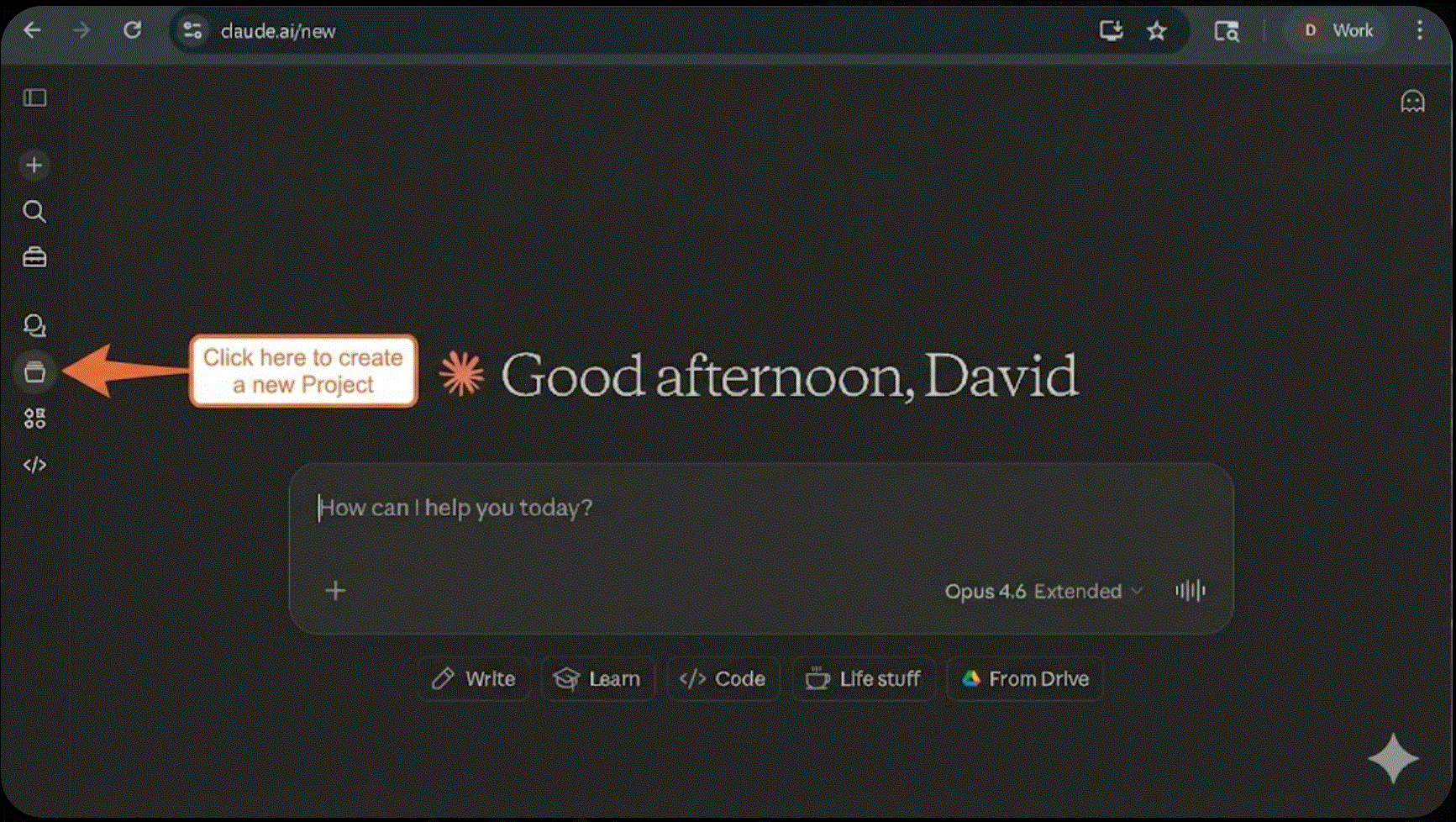
Once you’re logged in, you’ll see the main chat screen. Look for Projects in the left sidebar.
Click Projects, then click Create Project. Give it a name — something like “Thunderprose” or “Writing Arena” or “The Place Where Adverbs Go to Die.” Whatever speaks to you.
Step 3: Paste the Prompt and Follow the Instructions
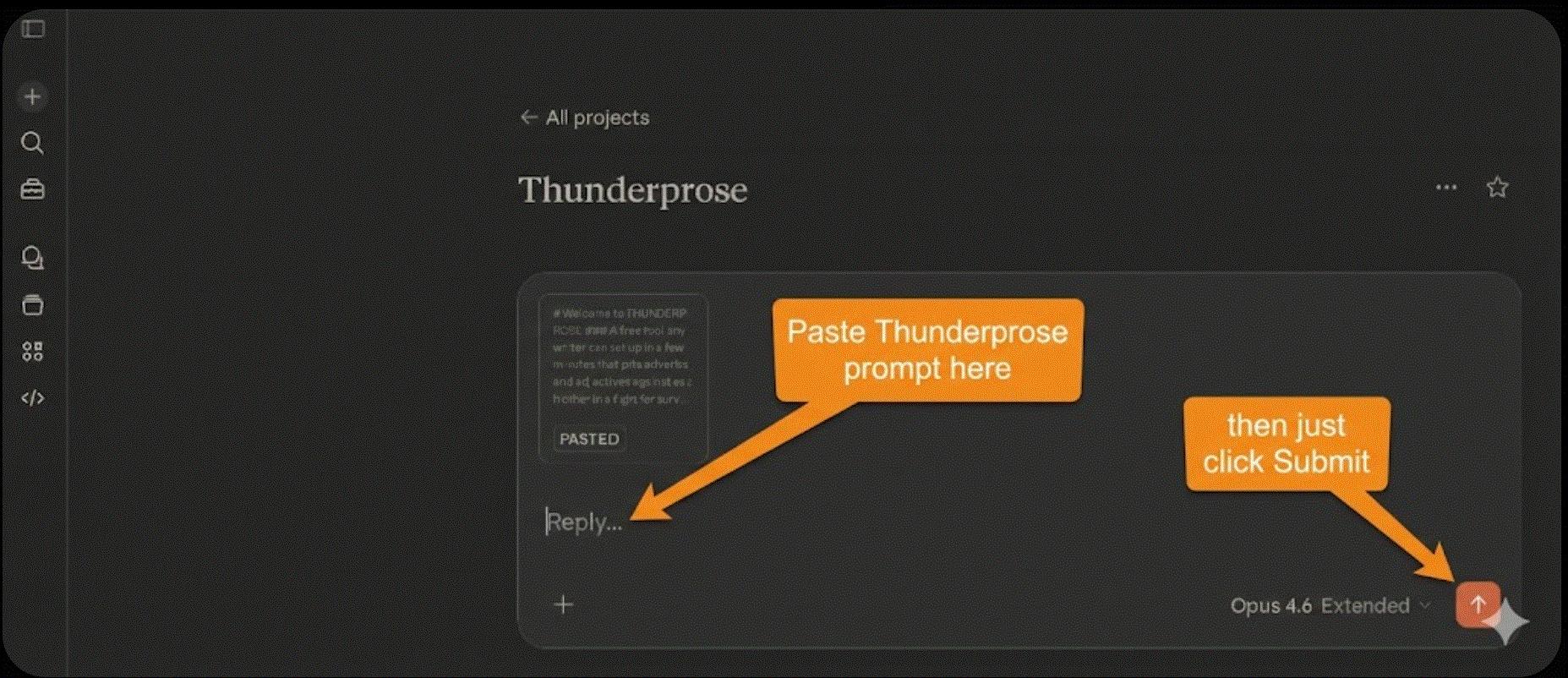
Open a conversation inside your new project and paste the full Thunderprose prompt (above) into the chat window. Hit enter. Claude will recognize that this is a first-time setup and walk you through a quick process to install the prompt into your project. Just follow the instructions — it takes about thirty seconds.
Step 4: Run It
Once setup is done, open a new chat in your Thunderprose project (or whatever you called it) and type:
Start Thunderprose
The Master of the Arena will introduce himself. He’ll ask for your prose. Paste in a paragraph, a page, a chapter — whatever you want stress-tested. Then watch the carnage unfold. That’s it!
If you have ANY problems setting this up, feel free to DM me and I’ll try to help!
Step 5: Argue With the Results
This is the most important step, and it’s not optional.
Thunderprose will flag words. It will kill some. It will crown others. It will suggest replacements. Read every ruling and decide for yourself whether you agree.
Sometimes the arena is right and a word needs to go. Sometimes the arena is wrong because it doesn’t know your character’s voice, your story’s rhythm, or the specific thing you’re trying to do in that sentence. That’s fine. That’s the point. The tool finds the weak spots. You make the calls.
Go Break Some Adverbs
Thunderprose is free to set up, fun to use, and — if you actually argue with its rulings — genuinely useful for tightening your prose. It won’t rewrite your book. It’ll just grab your laziest words by the collar, drag them into a spotlight, and ask them to justify their existence.
Some of them won’t be able to.
The Arena is open. Bring your pages.
⚔️
Ok David. I believe this could be a useful tool. But… I am finding MANY -nearly ALL- sites that I might consider submitting my work to, state “absolutely no AI usage”. They aren’t just talking about AI writing, any amount of AI editing is a red flag. To me it’s simply a checker, like spelling or grammar, but to these folks…. hummm. Not so much of a grey area.
I've been trying this for a couple of days now. Even if I don't use this for every paragraph, I'm learning to recognize useless or redundant words, and as a teaching tool, this is wonderful. Love it!